Clipping Software Explained: Complete Guide, Types, Benefits & Best Tools (2026)
Introduction to Clipping Software
In today’s digital world, content is created and shared at an extremely fast pace. Whether it is images, videos, screenshots, or audio files, people often need to focus on specific parts of content rather than using the entire file. This is where clipping software becomes an essential tool. It helps users remove unnecessary portions and keep only the most relevant parts, making content clearer, more professional, and easier to use.
Clipping software is widely used by designers, content creators, marketers, students, and even everyday computer users. From editing product images for online stores to creating short video clips for social media, its applications are vast and continuously growing.
What is Clipping Software?
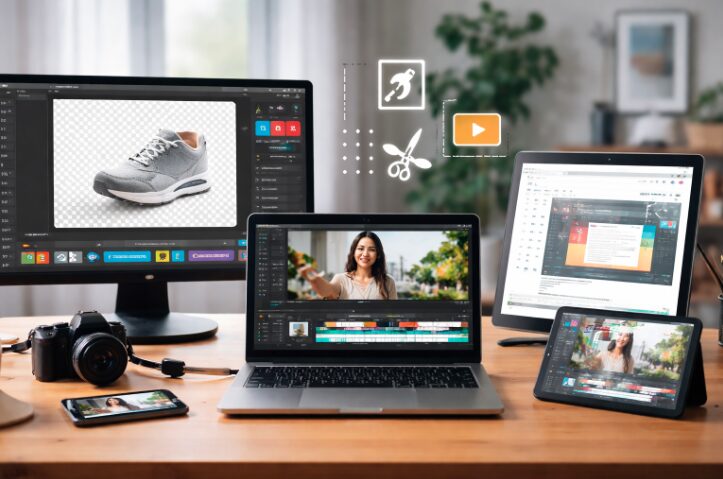
Clipping software refers to digital tools that allow users to cut, trim, or isolate a specific part of content such as an image, video, screen, or audio file. The main goal is to eliminate unwanted sections and highlight the important part.
In simple terms, clipping software works like a digital scissors tool. Instead of physically cutting something, it allows you to select a portion of content and remove everything else. This makes the final output more focused and visually appealing.
For example, if you have a large image with unnecessary background elements, clipping software can help you isolate the main subject and remove distractions.
How Clipping Software Works
Clipping software follows a straightforward process, which makes it easy for beginners to use. Although different tools may have advanced features, the basic workflow remains the same.
First, the user selects the content they want to edit. This could be an image, video, or even a portion of the screen. Then, the user defines the area they want to keep. This is done using selection tools, cropping tools, or timeline markers in video editing.
After selecting the desired portion, the software removes or hides the unwanted parts. Finally, the clipped content is saved or exported in a suitable format.
Modern clipping software often includes advanced technologies such as artificial intelligence. These tools can automatically detect subjects, remove backgrounds, and even identify important highlights in videos, reducing manual effort.
Types of Clipping Software
Clipping software is not limited to one type of content. It is designed for different purposes, and each type serves a unique function.
Image Clipping Software
Image clipping software is commonly used in graphic design and photo editing. It allows users to remove backgrounds, isolate objects, and enhance visual presentation. This type of clipping is especially important in eCommerce, where clean and professional product images are required.
For instance, online stores often use clipping software to display products on a plain background, making them more attractive to customers.
Video Clipping Software
Video clipping software is widely used by content creators and marketers. It allows users to extract short clips from longer videos. This is particularly useful for creating highlights, promotional content, and social media posts.
For example, a one-hour webinar can be turned into multiple short clips for platforms like YouTube Shorts or TikTok.
Screen Clipping Tools
Screen clipping tools are designed to capture specific areas of a computer screen. These tools are useful for creating tutorials, saving important information, or sharing visual content quickly.
Instead of taking a full screenshot, users can capture only the relevant section, which improves clarity and reduces unnecessary details.
Audio Clipping Tools
Audio clipping tools are used to trim and extract specific parts of sound recordings. These are commonly used in podcast editing, music production, and voice recordings.
Users can remove silence, cut unwanted noise, or extract important audio segments for reuse.
Key Features of Clipping Software
Clipping software includes a variety of features that make it efficient and user-friendly. These features help users perform tasks quickly while maintaining high quality.
Some of the most important features include:
- Precise cutting and trimming tools
- Background removal capabilities
- Screen capture functionality
- Annotation tools such as text, arrows, and highlights
- Support for multiple file formats
- AI-based automatic detection and clipping
These features make clipping software suitable for both beginners and professionals.
Benefits of Using Clipping Software
Clipping software offers several advantages that improve productivity and content quality. It simplifies complex editing tasks and allows users to achieve professional results with minimal effort.
One of the main benefits is time-saving. Instead of manually editing content for long hours, users can quickly clip and finalize their work. It also enhances visual appeal by removing unnecessary elements and focusing on the main subject.
Another important benefit is improved communication. By highlighting only the relevant parts, users can convey their message more effectively. This is particularly useful in presentations, tutorials, and marketing materials.
Additionally, clipping software supports creativity. Users can experiment with different styles, formats, and content ideas without needing advanced technical skills.
Common Uses of Clipping Software
Clipping software is used in various industries and everyday tasks. Its versatility makes it an essential tool for many professionals.
Some common uses include:
- Editing product images for eCommerce websites
- Creating short video clips for social media platforms
- Capturing screenshots for tutorials and guides
- Designing marketing materials and advertisements
- Extracting important sections from audio recordings
These applications show how clipping software plays a crucial role in modern digital workflows.
Popular Clipping Software Examples
There are many clipping software tools available, each designed for specific purposes. Some focus on image editing, while others specialize in video or screen clipping.
Below is a comparison of some popular tools:
| Software Name | Main Use | Key Feature |
|---|---|---|
| Snagit | Screen clipping | Advanced screenshot editing |
| ShareX | Screen capture | Free and open-source |
| Adobe Photoshop | Image clipping | Professional background removal |
| CapCut | Video clipping | Easy short video creation |
| Lightshot | Screenshot tool | Simple and fast clipping |
Each tool has its strengths, and the choice depends on user needs and experience level.
Clipping Software vs Editing Software
Many people confuse clipping software with editing software, but they are not the same. Clipping software focuses on removing unwanted parts, while editing software offers a broader range of features.
Here is a simple comparison:
| Feature | Clipping Software | Editing Software |
|---|---|---|
| Purpose | Extract specific parts | Full content editing |
| Complexity | Easy to use | More advanced |
| Speed | Fast processing | Time-consuming |
| Use Case | Quick clipping tasks | Detailed editing projects |
Clipping software can be considered a part of editing, but it is more focused and efficient for specific tasks.
How to Choose the Best Clipping Software
Choosing the right clipping software depends on your requirements. Not all tools are suitable for every task, so it is important to evaluate your needs carefully.
You should first identify the type of content you want to work with, whether it is images, videos, or screen captures. Then, consider the ease of use, especially if you are a beginner.
It is also important to check for advanced features such as AI tools, automation, and compatibility with your device. Some users prefer free tools, while others may invest in premium software for better performance.
By comparing different options, you can select the clipping software that best fits your workflow.
Future Trends in Clipping Software
Clipping software is evolving rapidly with advancements in technology. One of the most significant trends is the integration of artificial intelligence.
AI-powered clipping tools can automatically detect objects, remove backgrounds, and identify important moments in videos. This reduces manual effort and increases efficiency.
Cloud-based clipping software is also becoming popular, allowing users to access their tools and projects from anywhere. Additionally, real-time editing and voice-controlled commands are expected to become more common in the future.
These innovations will make clipping software even more powerful and accessible.
Conclusion
Clipping software has become an essential tool in the digital age. It allows users to focus on what truly matters by removing unnecessary parts of content. Whether you are editing images, creating video clips, or capturing screenshots, clipping software simplifies the process and improves results.
With its wide range of features, benefits, and applications, clipping software is useful for both beginners and professionals. As technology continues to advance, these tools will become even more efficient, making content creation faster and more effective than ever before.
FAQs
1. What is clipping software used for?
Clipping software is used to cut, trim, or extract specific parts of images, videos, audio, or screens.
2. Is clipping software free?
Some clipping software tools are free, while others offer premium features with paid plans.
3. Can beginners use clipping software?
Yes, most clipping software is designed to be user-friendly and suitable for beginners.
4. What is the difference between clipping and cropping?
Cropping usually refers to resizing an image, while clipping focuses on isolating specific parts.
5. Which is the best clipping software?
The best clipping software depends on your needs, such as image editing, video clipping, or screen capture.