Surface Laptop 3 Cracked Screen: Causes, Repair Options, Costs, and Prevention Guide
The Microsoft Surface Laptop 3 is known for its premium design, high-resolution touchscreen, and slim aluminum body. Many professionals, students, and creators choose this laptop because it combines elegant design with powerful performance. However, one issue that some users encounter is a surface laptop 3 cracked screen.
A cracked laptop screen can be frustrating because it affects both the appearance and functionality of the device. Sometimes the crack is only cosmetic, while in other cases it can interfere with the display or touchscreen response. Understanding the reasons behind this issue, the repair options available, and the steps to prevent future damage can help users protect their investment and make informed decisions.
This comprehensive guide explains everything about the surface laptop 3 cracked screen problem in simple and easy language. It covers causes, symptoms, repair methods, costs, and preventive tips.
Introduction to Surface Laptop 3 Screen Problems
Laptop screens are delicate components, especially in modern ultra-thin devices. The display glass used in the Microsoft Surface Laptop 3 is designed to be thin and lightweight while still supporting a high-resolution touchscreen. Because of this slim design, the screen can sometimes become vulnerable to physical damage or pressure.
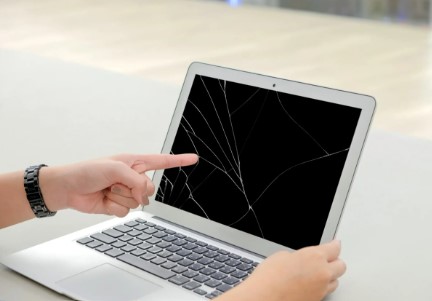
A surface laptop 3 cracked screen can appear in different ways. Some users notice a small hairline fracture that runs across the display, while others experience larger spider-web cracks after accidental drops or impacts. In some cases, the screen may still function normally, but the crack affects visibility and aesthetics.
Reports from users and technical investigations suggest that in rare situations, tiny hard particles trapped between the keyboard and screen can create pressure that causes a hairline fracture when the laptop is closed. Microsoft stated that this situation occurs in only a very small percentage of devices.
Although such cases are uncommon, they highlight how sensitive modern laptop displays can be.
Overview of the Surface Laptop 3 Display
To understand why a surface laptop 3 cracked screen happens, it helps to know how the display is designed.
The Surface Laptop 3 uses a PixelSense touchscreen display that combines several components into one thin assembly. Instead of separate layers, the protective glass, touch digitizer, and LCD panel are fused together.
The following table summarizes the main display features.
| Feature | Specification |
|---|---|
| Display Technology | PixelSense Touchscreen |
| Screen Sizes | 13.5-inch and 15-inch |
| Resolution | Up to 2256 × 1504 |
| Aspect Ratio | 3:2 |
| Touch Support | Multi-touch input |
| Protective Layer | Reinforced glass |
Because these layers are integrated, damage to the outer glass often means the entire display assembly must be replaced.
This design improves visual clarity and touch responsiveness but makes repairs more complicated and expensive.
Common Signs of a Surface Laptop 3 Cracked Screen
A surface laptop 3 cracked screen can show several symptoms depending on how severe the damage is. Sometimes the crack is immediately visible, while other times the issue becomes noticeable only after the display begins malfunctioning.
The most common signs include:
Visible cracks or fractures
The most obvious sign is a line or web-shaped crack across the screen glass. Hairline fractures may be difficult to see at certain angles.
Distorted display
The screen may show flickering images, unusual color patterns, or vertical lines. This usually means the internal LCD panel is damaged.
Touchscreen problems
Because the digitizer is attached to the display glass, cracks may cause the touchscreen to stop responding or register touches incorrectly.
Black spots or dead pixels
Dark areas appearing on the screen may indicate internal display damage.
If these symptoms appear, the laptop likely requires physical repair rather than a software fix.
Main Causes of a Surface Laptop 3 Cracked Screen
Several factors can lead to a surface laptop 3 cracked screen. While accidental damage is the most common cause, other conditions can also contribute.
Accidental Drops
Dropping the laptop onto a hard surface is one of the leading reasons for cracked screens. Even a short fall can generate enough force to damage the glass.
Pressure on the Laptop Lid
Heavy objects placed on the laptop can apply pressure to the display. For example, storing the laptop in a backpack with books or equipment may increase the risk of cracks.
Small Debris Between Screen and Keyboard
In rare cases, tiny particles trapped between the keyboard and screen can create pressure points when the laptop is closed. According to Microsoft, this can cause a hairline fracture in the display glass without obvious impact.
Temperature Changes
Extreme temperature fluctuations can weaken glass and make it more vulnerable to cracking.
Manufacturing or Design Issues
Some early users reported unexpected hairline cracks appearing on their devices even without visible damage. While such cases are rare, they have been investigated by Microsoft.
Types of Surface Laptop 3 Screen Damage
Not every surface laptop 3 cracked screen looks the same. The type of damage often determines whether the laptop remains usable.
Hairline Crack
A hairline crack is a thin fracture across the glass surface. It may be difficult to notice and often does not affect the display immediately.
Spider-Web Crack
This type of damage spreads outward from a central impact point, forming multiple branching cracks.
Shattered Screen
Severe impacts may cause the entire screen glass to break into many fragments.
Internal Display Damage
Sometimes the outer glass remains intact, but the LCD panel underneath is damaged. This results in color distortions, black patches, or vertical lines.
Can You Use a Laptop with a Cracked Screen?
Many users continue using their devices even after discovering a surface laptop 3 cracked screen. In certain cases, the laptop still functions normally.
For example, if the crack only affects the outer glass layer, the display image and touchscreen may continue working. However, this situation can worsen over time.
Potential risks of continued use include:
- The crack spreading further across the screen
- Touchscreen malfunction
- Small glass fragments becoming loose
- Reduced display visibility
If the screen becomes difficult to use, connecting the laptop to an external monitor can serve as a temporary solution.
Repair Options for a Surface Laptop 3 Cracked Screen
When dealing with a surface laptop 3 cracked screen, users have several repair options.
Official Microsoft Repair
The most reliable solution is to contact Microsoft support and request a repair service. Users must register their device and follow the online service process before shipping the laptop for repair.
In some cases where the crack appears without visible damage, Microsoft may repair the device for free during the warranty period.
Authorized Repair Centers
Certified technicians can replace the entire display assembly using original parts.
Third-Party Repair Shops
Independent repair shops often offer lower prices. However, the quality of parts and workmanship may vary.
DIY Screen Replacement
Experienced technicians may attempt to replace the screen themselves. This process requires specialized tools and careful handling because the display is attached using adhesive and delicate connectors.
Surface Laptop 3 Screen Replacement Cost
Repair costs vary depending on the model and service provider.
The following table shows approximate price ranges.
| Repair Type | Estimated Cost |
|---|---|
| Official repair service | $300 – $600 |
| Third-party repair | $200 – $450 |
| DIY replacement parts | $200 – $350 |
Prices may increase if additional components such as cables or internal display layers are damaged.
Because the display assembly includes the touchscreen and LCD panel, replacing the screen is more expensive than repairing older laptops with separate components.
Typical Screen Replacement Process
Repairing a surface laptop 3 cracked screen usually follows several technical steps performed by professionals.
The process generally includes:
- Powering off the device and removing internal screws.
- Disconnecting display cables and internal components.
- Carefully separating the cracked screen using heat tools.
- Installing the new display assembly.
- Reconnecting cables and testing the touchscreen.
- Reassembling the laptop frame.
This procedure requires precision tools and technical experience, which is why professional repair is recommended.
Tips to Prevent Surface Laptop 3 Screen Damage
Preventing a surface laptop 3 cracked screen is easier than repairing it. Simple protective habits can significantly reduce the risk.
Important prevention tips include:
- Use a padded laptop sleeve or case when traveling.
- Avoid placing heavy objects on top of the laptop.
- Keep the keyboard clean to prevent debris from getting trapped.
- Close the lid gently without applying pressure.
- Consider installing a thin screen protector.
These small steps can extend the life of the display and protect the laptop from accidental damage.
When Replacement Might Be Better Than Repair
Sometimes repairing a surface laptop 3 cracked screen may not be the most practical option.
Replacing the entire laptop might make more sense if:
- The repair cost is close to the laptop’s current value
- Multiple hardware components are damaged
- The device is several years old
In such cases, upgrading to a newer model could provide better performance and long-term value.
Frequently Asked Questions
Can a surface laptop 3 cracked screen be repaired?
Yes, but usually the entire display assembly must be replaced because the glass, LCD, and touch digitizer are fused together.
Does warranty cover a cracked screen?
Standard warranties typically do not cover accidental damage. However, some cases involving unexplained hairline fractures may qualify for repair during the warranty period.
How long does screen repair take?
Professional repairs often take between one and three hours if the replacement parts are available.
Can I replace only the glass?
In most cases, no. The glass layer is bonded to the LCD and touch panel, so replacing the entire display assembly is necessary.
Conclusion
A surface laptop 3 cracked screen can be frustrating, but it does not necessarily mean the laptop is unusable. By understanding the causes, recognizing the symptoms, and exploring repair options, users can decide whether to repair or replace their device.
Proper handling, regular cleaning, and protective accessories can help prevent screen damage and extend the lifespan of the Microsoft Surface Laptop 3. With careful maintenance, this premium laptop can continue delivering reliable performance for many years.